
hidpi
Table of Contents
**This is an old revision of the document!**
High DPI Support
NOTE: Adjusting font settings can cause some window buttons to be scaled outside the view of a window. One such case is the Add Role window for a settlement; the Save Role button can't be seen, thus can't be clicked to save the role. If this happens to you, you may have to adjust font size and/or screen resolution.
- Make sure you don't have Wurm Unlimited running.
- If you have a shortcut for the Wurm Client executable, right click and select Properties. Otherwise, navigate to the WurmLauncher folder and find WurmLauncher.exe, then right click and select Properties.
- In the Properties change to the Compatibility tab.
- Click the Change High DPI Settings button.
- Check both checkboxes on the High DPI Settings window and set the lower drop box to System.
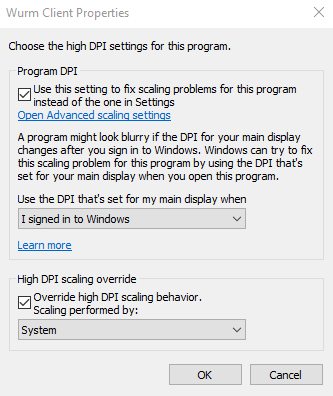
- Click Ok on both windows to accept the new settings.
- Open the Wurm Client (WurmLauncher.exe) and click on the Settings button (the gear). Go to the Text tab. Modify font settings. Load into the game and test. Repeat until you achieve desired results.

hidpi.1710376430.txt.gz · Last modified: by freth