
hidpi
Table of Contents
**This is an old revision of the document!**
High DPI Support
- Make sure you don't have Wurm Unlimited running.
- If you have a shortcut for the Wurm Client executable, right click and select Properties. Otherwise, navigate to the WurmLauncher folder and find WurmLauncher.exe, then right click and select Properties.
- In the Properties change to the Compatibility tab.
- Click the Change High DPI Settings button.
- Check both checkboxes on the High DPI Settings window and set the lower drop box to System.
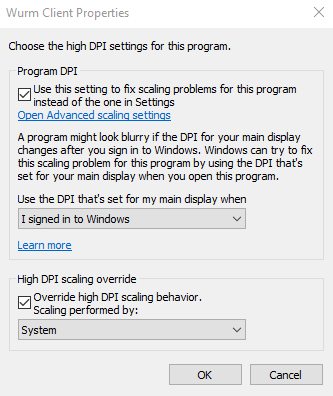
- Click Ok on both windows to accept the new settings.
- Open the Wurm Client (WurmLauncher.exe) and click on the settings button (the gear). Modify font settings. Load into the game and test. Repeat until you achieve desired results.

hidpi.1710376154.txt.gz · Last modified: by freth